Portuguese | English
--- [](https://packagist.org/packages/gerencianet/gerencianet-sdk-php) [](https://packagist.org/packages/gerencianet/gerencianet-sdk-php) [](https://packagist.org/packages/gerencianet/gerencianet-sdk-php) [](https://travis-ci.org/gerencianet/gn-api-sdk-php) [](https://codeclimate.com/github/gerencianet/gn-api-sdk-php) [](https://codeclimate.com/github/gerencianet/gn-api-sdk-php/coverage) SDK in PHP for integration with Gerencianet API. For more informations about parameters and values, please refer to [Gerencianet](http://gerencianet.com.br) documentation. Jump To: * [Requirements](#requirements) * [Teted with](#tested-with) * [Installation](#installation) * [Getting started](#getting-started) * [How to get Client_Id and Client_Secret credentials](#how-to-get-client-id-and-client-secret-credentials) * [How to generate a Pix certificate](#how-to-generate-a-pix-certificate) * [How to convert a Pix certificate](#how-to-convert-a-pix-certificate) * [How to register Pix keys](#how-to-register-pix-keys) * [Running examples](#running-examples) * [Version Guidance](#version-guidance) * [Additional Documentation](#additional-documentation) * [License](#license) --- ## **Requirements** * PHP >= 7.2 * Guzzle >= 7.0 * Extension ext-simplexml ## **Tested with** ``` PHP 7.2, 7.4 and 8.0 ``` ## **Installation** Clone this repository and execute the following command to install the dependencies ``` $ composer install ``` If you already have a project with composer, include the dependency in your composer.json file: ``` ... "require": { "gerencianet/gerencianet-sdk-php": "^4" }, ... ``` Or require this package with [composer](https://getcomposer.org/): ``` $ composer require gerencianet/gerencianet-sdk-php ``` ## **Getting started** Require the module and namespaces: ```php require __DIR__ . '/vendor/autoload.php'; use Gerencianet\Gerencianet; ``` Although the web services responses are in json format, the SDK will convert any server response to array. The code must be within a try-catch and exceptions can be handled as follow: ```php try { /* Code */ $api = new Gerencianet($options); // Instance of class Gerencianet, passing $options, array with credentials $response = $api->createCharge([], $body); // Execution of the function. All functions are found in `/src/Gerencianet/config.json` } catch(GerencianetException $e) { /* Gerencianet API errors will come here */ } catch(Exception $ex) { /* Other errors will come here */ } ``` To begin, you must configure the parameters in the config.json file. Instantiate the information `client_id`, `client_secret` for authentication and `sandbox` equal to *true*, if your environment is Homologation, or *false*, if it is Production. If you use Pix charges, inform in the attribute `pix_cert` with the relative directory and name of your certificate in .pem format. See configuration examples below: ### **For homologation environment** Instance of module parameters using client_id, client_secret, sandbox equal to `true` and pix_cert as the name of the approval certificate: ```php $options = [ 'client_id' => 'client_id', 'client_secret' => 'client_secret', 'pix_cert' => '../certs/developmentCertificate.pem', 'sandbox' => true, 'debug' => false, 'timeout' => 30 ]; $api = new Gerencianet($options); ``` ### **For production environment** Instantiate module parameters using client_id, client_secret, sandbox equal to `false` and pix_cert as the production certificate name: ```php $options = [ 'client_id' => 'client_id', 'client_secret' => 'client_secret', 'pix_cert' => '../certs/productionCertificate.pem', 'sandbox' => false, 'debug' => false, 'timeout' => 30 ]; $api = new Gerencianet($options); ``` ## **How to get Client-Id and Client-Secret credentials** **Create a new application to use the Gerencianet API:** 1. Access the Gerencianet panel in the **API** menu. 2. In the left corner, click on **Minhas Aplicações** then on **Nova Aplicação**. 3. Enter a name for the application, activate the **API de emissões (Boletos e Carnês)** and **API Pix**, and choose the scopes you want to release in **Produção** and/or **Homologação** as needed (remembering that these can be changed later). 4. Click **Criar nova aplicação**. 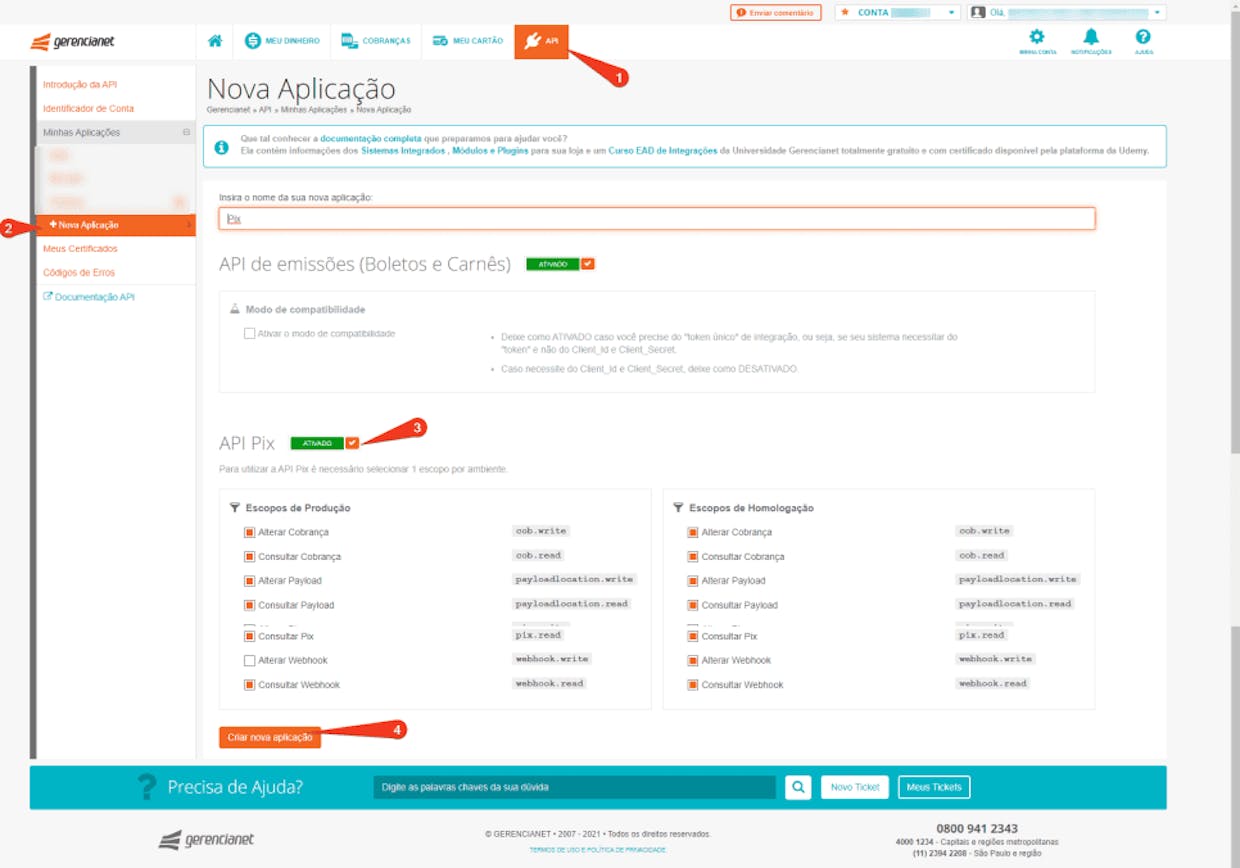 **Change an existing application to use the Pix API:** 1. Access the Gerencianet panel in the **API** menu. 2. In the left corner, click on **Minhas Aplicações**, choose your application and click on the **Editar** button (Orange button). 3. Activate API Pix (3) and choose the scopes you want to release in **Produção** and/or **Homologação** as needed (remembering that these can be changed later) 4. Click **Atualizar Aplicação**.  ## **How to generate a Pix certificate** All Pix requests must contain a security certificate that will be provided by Gerencianet within your account, in PFX(.p12) format. This requirement is fully described in the .[PIX security manual](https://www.bcb.gov.br/estabilidadefinanceira/comunicacaodados). **To generate your certificate:** 1. Access the Gerencianet panel in the **API** menu. 2. In the left corner, click on **Meus certificados** and choose the environment in which you want the certificate: **Produção** or **Homologação**. 3. Click **Novo certificado**.  ## **How to convert a Pix certificate** :warning: For use in PHP, the certificate must be converted to `.pem` format. You can [download the certificate converter made available by Gerencianet](https://pix.gerencianet.com.br/ferramentas/conversorGerencianet.exe). Or use the example below, running the OpenSSL command for conversion. ### **Command OpenSSL** ``` // Generate certificate and key in single file openssl pkcs12 -in certificado.p12 -out certificado.pem -nodes ``` ## **How to register Pix keys** The registration of Pix keys can be done through the Gerencianet application or through an API endpoint. Below you will find the steps on how to register them. ### **Register Pix key via mobile app:** If you don't already have our app installed, click on [Android](https://play.google.com/store/apps/details?id=br.com.gerencianet.app) or [iOS](https://apps.apple.com/br/app/gerencianet/id1443363326), according to your smartphone's operating system, to download it. To register your Pix keys through the application: 1. Access your account through **app Gerencianet**. 2. In the side menu, touch **Pix** to start your registration. 3. Read the information that appears on the screen and click **Registrar Chave**. If this is no longer your first contact, tap **Minhas Chaves** and then the icon (➕). 4. **Select the data** you are going to register as a Pix Key and tap **avançar** - you must choose at least 1 of the 4 available key options (cell, e-mail, CPF e/ou random key). 5. After registering the desired Pix keys, click on **Concluir**. 6. **Ready! Your keys are already registered with us.** ### **Register Pix key via API:** The endpoint used to create a random Pix key (evp), is `POST /v2/gn/evp` ([Register evp key](https://dev.gerencianet.com.br/docs/api-pix-endpoints#section-criar-chave-evp)). A detail is that, through this endpoint, only random Pix keys are registered. To consume it, just run the `/examples/pix/key/create.php` example from our SDK. The request sent to this endpoint does not need a body. The example response below represents Success (201), showing the registered Pix key. ```json { "chave": "345e4568-e89b-12d3-a456-006655440001" } ``` ## **Running examples** You can run using any web server, like Apache or nginx, or simple start a php server as follow: ```php php -S localhost:9000 ``` Then open any example in your browser. :warning: Some examples require you to change some parameters to work, like `examples/charge/oneStepBillet.php` or `examples/pix/charge/create.php` where you must change the id parameter. ## **Version Guidance** | Version | Status | Packagist | Repo | PHP Version | | --- | --- | --- | --- | --- | | 1.x | Maintained | `gerencianet/gerencianet-sdk-php` | [v1](https://github.com/gerencianet/gn-api-sdk-php/tree/1.x) | \>= 5.4 | | 2.x | Maintained | `gerencianet/gerencianet-sdk-php` | [v2](https://github.com/gerencianet/gn-api-sdk-php/tree/2.x) | \>= 5.5 | | 3.x | Maintained | `gerencianet/gerencianet-sdk-php` | [v3](https://github.com/gerencianet/gn-api-sdk-php/tree/3.x) | \>= 5.6 | | 4.x | Maintained | `gerencianet/gerencianet-sdk-php` | [v4](https://github.com/gerencianet/gn-api-sdk-php) | \>= 7.2 | ## **Additional Documentation** Complete documentation with all endpoints and API details is available at https://dev.gerencianet.com.br/. If you don't have a Gerencianet digital account yet, [open yours now](https://sistema.gerencianet.com.br/)! ## **License** [MIT](LICENSE)